The productivity landscape of 2026 is filled with new challenges and constant digital distractions, making it harder than ever to stay organized. Enter the notion planner, a powerful digital tool that is transforming how individuals and teams structure their lives for ultimate efficiency. These planners combine customization, flexibility, and integration to meet the demands of modern productivity. In this post, discover why a notion planner is essential for success in 2026 and explore seven innovative planner ideas designed to help you achieve your goals with clarity and confidence.
In 2026, productivity demands have reached unprecedented heights. The pace of work, learning, and personal growth requires tools that can keep up. Enter the Notion planner, a digital solution transforming how people organize information, set goals, and manage daily tasks. As analog systems fade, Notion planners are taking center stage for those seeking an edge in efficiency.
The journey from paper planners to digital tools has been swift. Traditional notebooks, while nostalgic, simply cannot match the adaptability of a Notion planner. As workflows became more complex, static solutions lost their appeal. Notion’s rise is rooted in its ability to unify disparate productivity needs into one customizable workspace. This shift has made the Notion planner a staple for anyone aiming to stay organized in a digital-first world.
What sets the Notion planner apart is its unmatched flexibility. Users can build dashboards for everything from daily task lists to long-term goal tracking. Customization is at the heart of Notion, letting users tweak layouts, add databases, and integrate with other productivity apps. Scalability is another advantage, making the Notion planner suitable for both solo users and large teams. Its real-time collaboration features support remote and hybrid work, which have become the norm in 2026.
A key benefit of the Notion planner is how it adapts to various productivity styles. For students, it offers academic calendars, assignment trackers, and study logs. Professionals can manage projects, meetings, and performance metrics in one place. Entrepreneurs use Notion planners to oversee business growth, finances, and team workflows. For a curated collection of top templates that suit these diverse needs, explore the Best Notion planner templates to find your perfect fit.
Collaboration is another pillar of the Notion planner’s success. Teams can co-edit documents, assign tasks, and share progress without switching platforms. This interconnectedness streamlines communication, reduces duplication, and fosters accountability. Leading organizations use Notion planners to build knowledge bases, manage onboarding, and coordinate cross-functional projects. Individuals benefit from seamless transitions between personal and professional planning, making the Notion planner a true all-in-one solution.
Notion’s user base has grown exponentially, with millions relying on its templates for daily productivity. In 2025, over 10,000 new templates were added to the platform, and user satisfaction ratings topped 4.7 out of 5. The 2026 Notion planner experience is further elevated by AI-powered features. Automation handles recurring tasks, smart reminders, and data analysis, reducing manual effort. Users can set up workflows that adapt as their needs evolve, ensuring their Notion planner always stays relevant.
The Notion planner is not just a digital notebook—it is a dynamic productivity hub. As technology advances, its role in supporting efficient, collaborative, and personalized productivity will only grow. In 2026, leveraging a Notion planner is not just an option, it is essential for anyone serious about achieving their goals.
Staying productive in 2026 requires more than just good intentions. The digital landscape is filled with distractions, and finding the right tools is crucial for maintaining focus and efficiency. A well-chosen Notion planner can transform the way you manage tasks, track goals, and balance life’s demands.
Below, explore seven standout Notion planner templates, each designed to address distinct productivity needs. Whether you seek comprehensive life management, streamlined scheduling, or goal-oriented tracking, there’s a solution here to elevate your workflow.
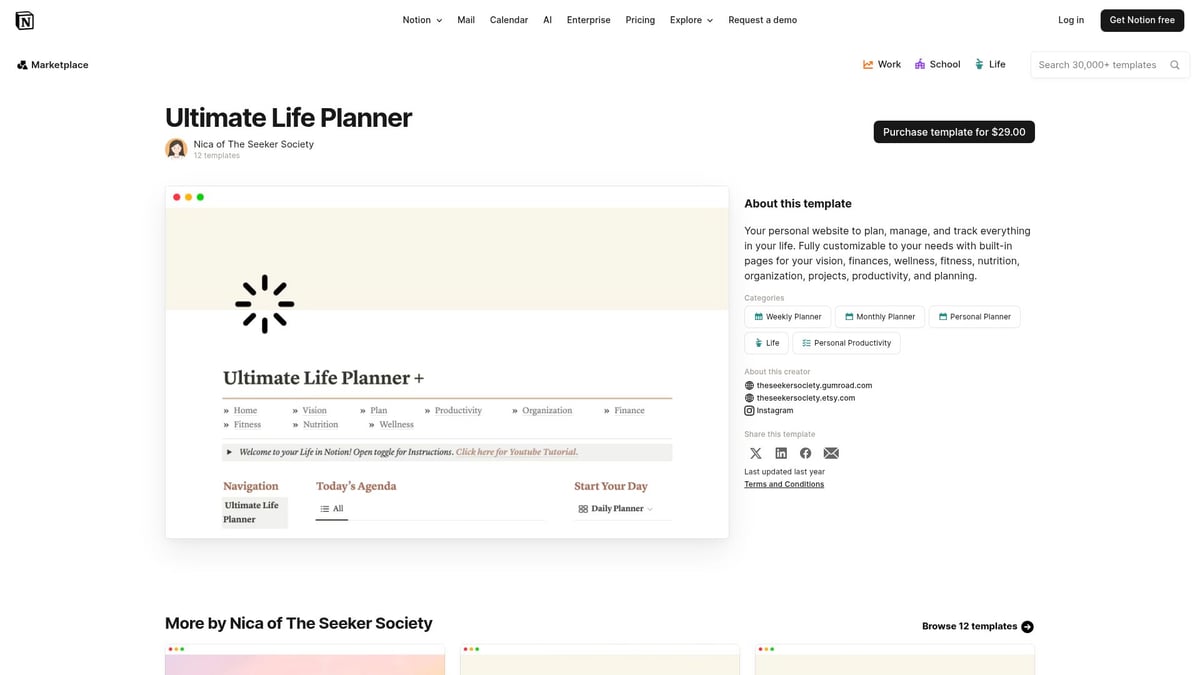
The Ultimate Life Planner is a premium Notion planner template priced at $29.00, offering a robust all-in-one dashboard for holistic life management. It combines goal-setting, habit tracking, financial planning, wellness logs, and daily scheduling in a single workspace. The modular structure allows users to customize each section, ensuring every aspect of life is organized.
Key Features:
Unique Selling Points:
Pros:
Cons:
Example Use Case:
Imagine setting your yearly goals in January, then breaking them down into quarterly milestones, monthly targets, and daily tasks, all within one Notion planner. This structure supports ongoing progress and reflection, driving real results.
For those committed to optimizing every area of life, this Notion planner stands out as a powerful foundation for 2026 productivity.
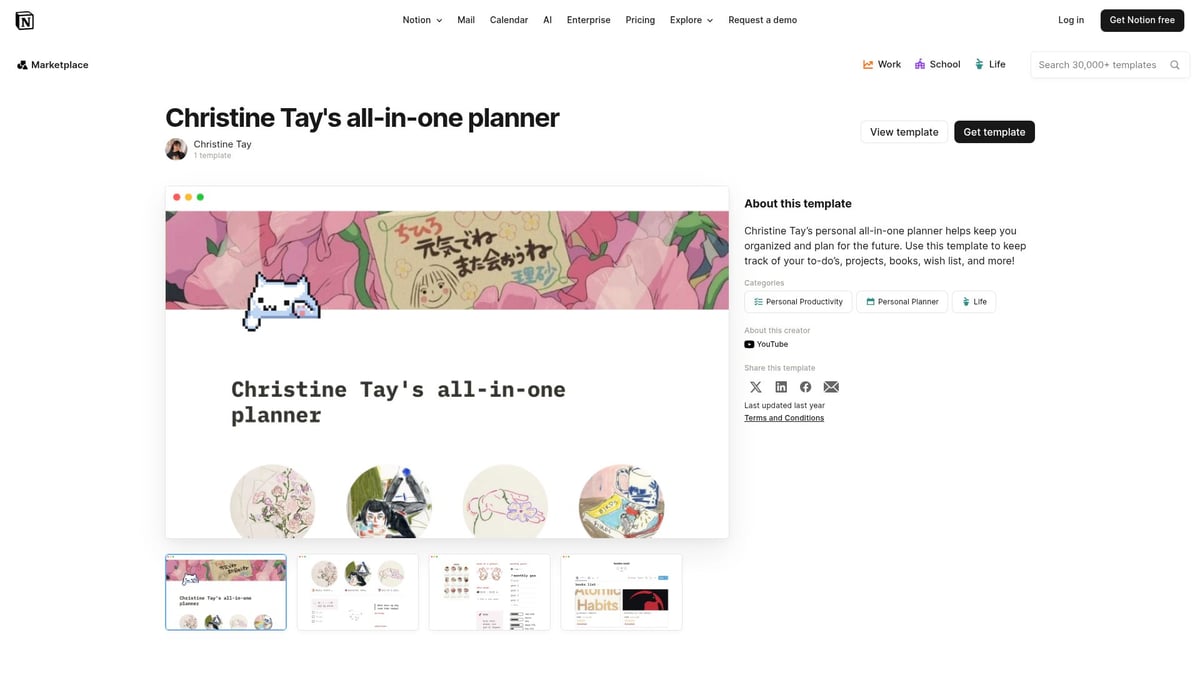
Christine Tay’s All-in-One Planner is a free Notion planner template that brings together daily, weekly, and monthly planning, habit tracking, and project management. Its user-friendly layout makes it accessible for a broad range of users, from busy professionals to students balancing multiple responsibilities.
Core Features:
Unique Selling Points:
Pros:
Cons:
Example:
A user can manage work deadlines and personal routines side by side, ensuring nothing slips through the cracks. This Notion planner template is especially valuable for those who want an organized yet flexible approach to their day-to-day productivity.
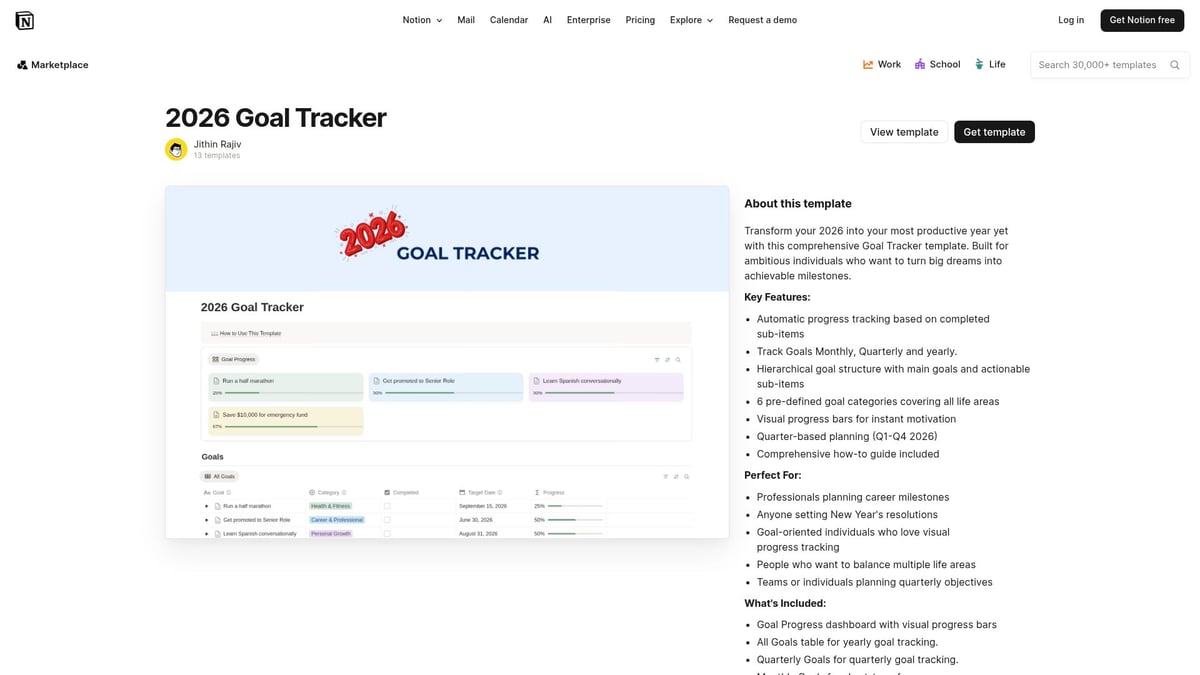
The 2026 Goal Tracker is a free Notion planner template designed specifically for goal-driven individuals. It supports annual, quarterly, and monthly tracking, complete with progress visualization tools to keep users motivated and accountable.
Core Features:
Unique Selling Points:
Pros:
Cons:
Example:
Track your New Year’s resolutions, set quarterly outcomes, and monitor monthly achievements, all within this Notion planner. For anyone prioritizing goal achievement in 2026, this tool offers focused support.
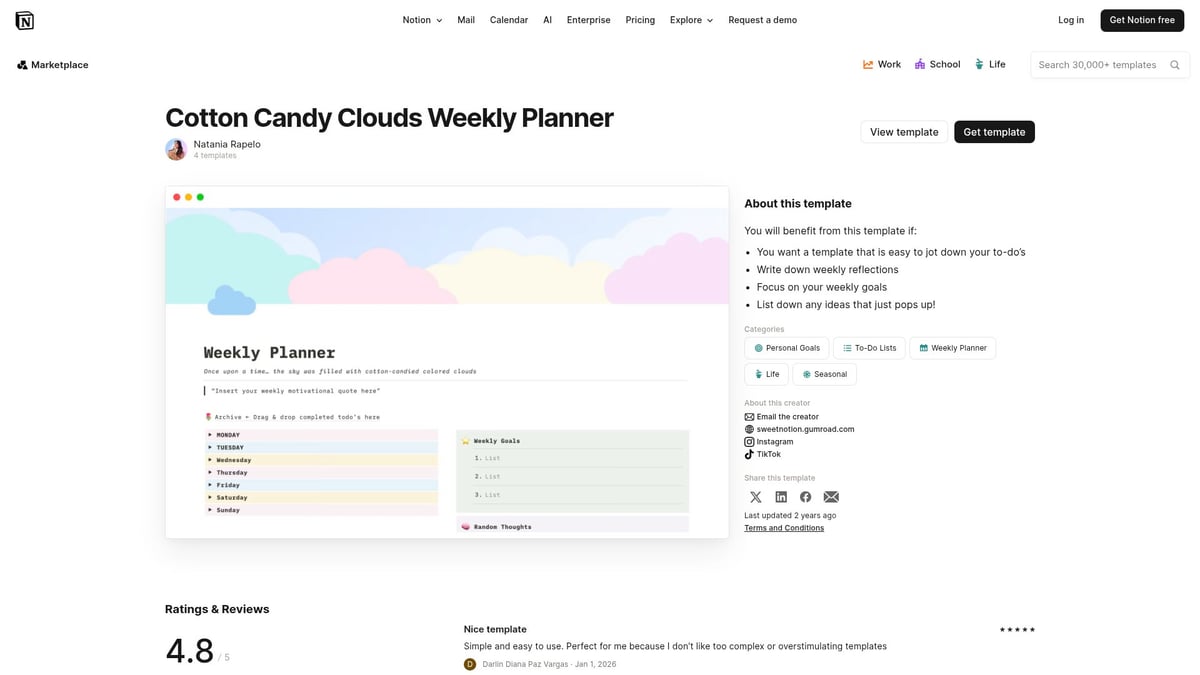
The Cotton Candy Clouds Weekly Planner is a visually uplifting Notion planner template, perfect for those who value aesthetics in their productivity tools. It’s free and features a soft, playful design that makes weekly planning enjoyable.
Core Features:
Unique Selling Points:
Pros:
Cons:
Example:
Manage your weekly assignments and self-care routines, using the mood tracker to stay in tune with your emotional health. This Notion planner brings a touch of creativity to everyday organization.
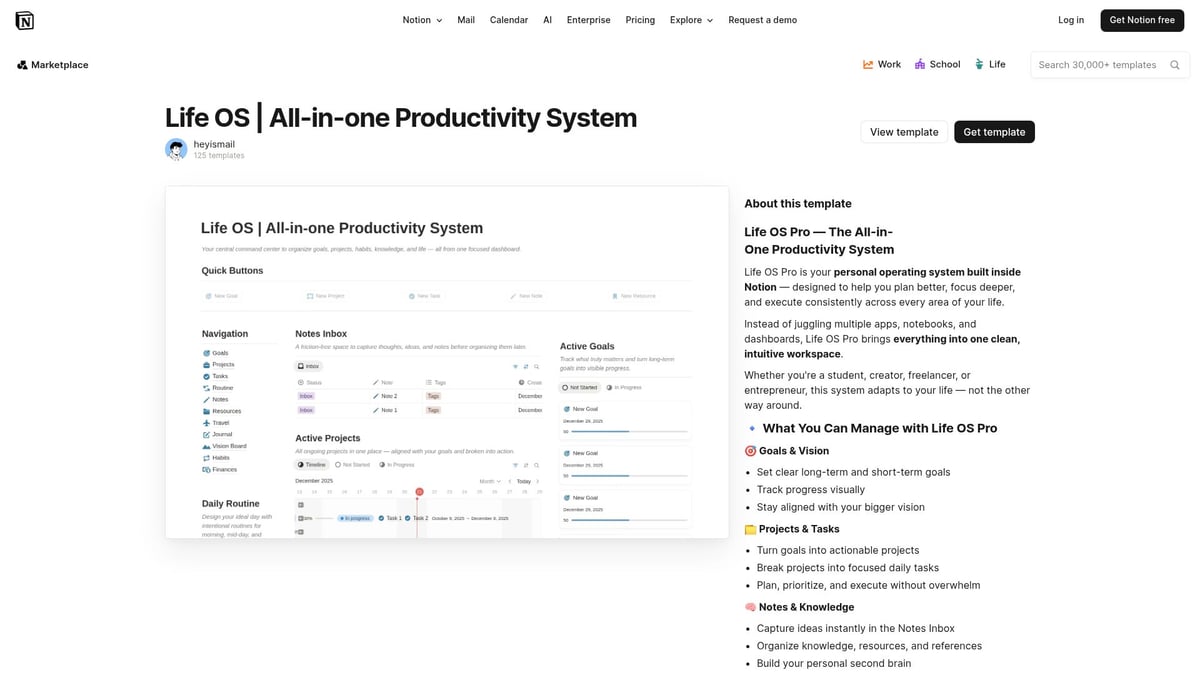
Life OS by heyismail is a free, modular Notion planner system designed for users who crave flexibility and depth. It centralizes tasks, goals, finances, health data, and more, making it ideal for entrepreneurs, freelancers, and Notion power users.
Core Features:
Unique Selling Points:
Pros:
Cons:
Example:
A freelancer can manage client projects, personal finances, and health routines, all within a single Notion planner workspace. This template empowers users to build a personal productivity system that scales with their ambitions.
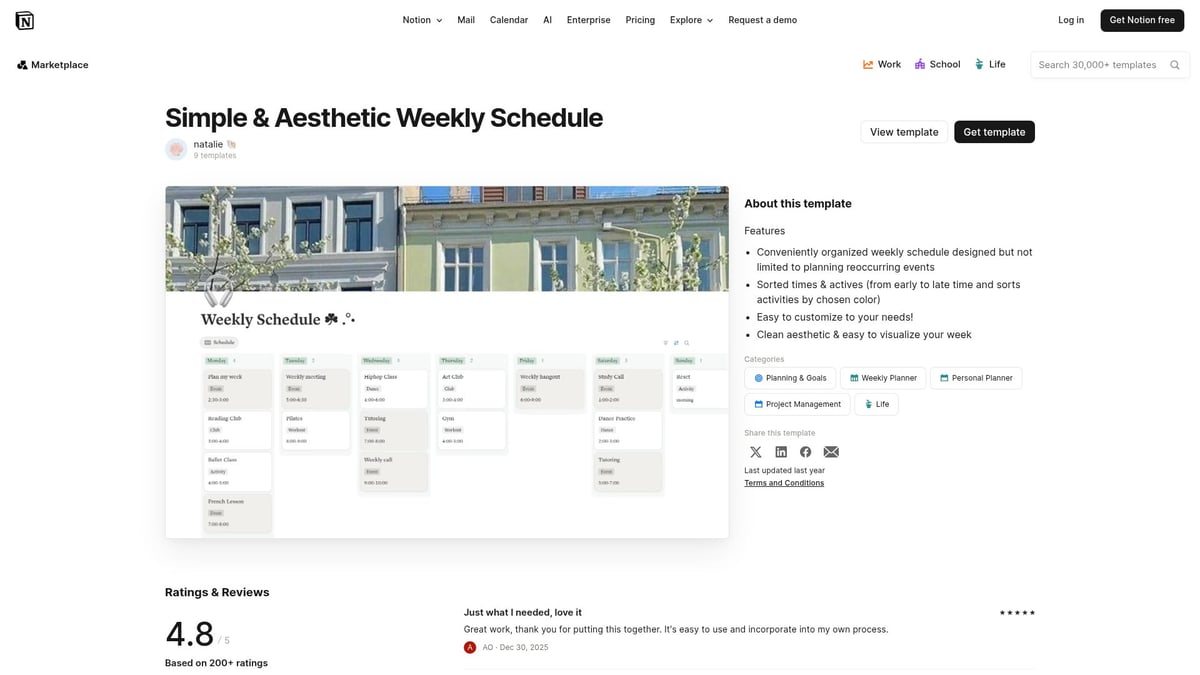
For those who prefer minimalism, the Simple & Aesthetic Weekly Schedule by natalie 🐚 offers a clean, clutter-free Notion planner template. It focuses on weekly scheduling, daily priorities, and habit tracking with a calming visual style.
Core Features:
Unique Selling Points:
Pros:
Cons:
Example:
Students can keep track of classes, appointments, and weekly goals without distraction. This Notion planner is perfect for users who value simplicity and efficiency in their organization.
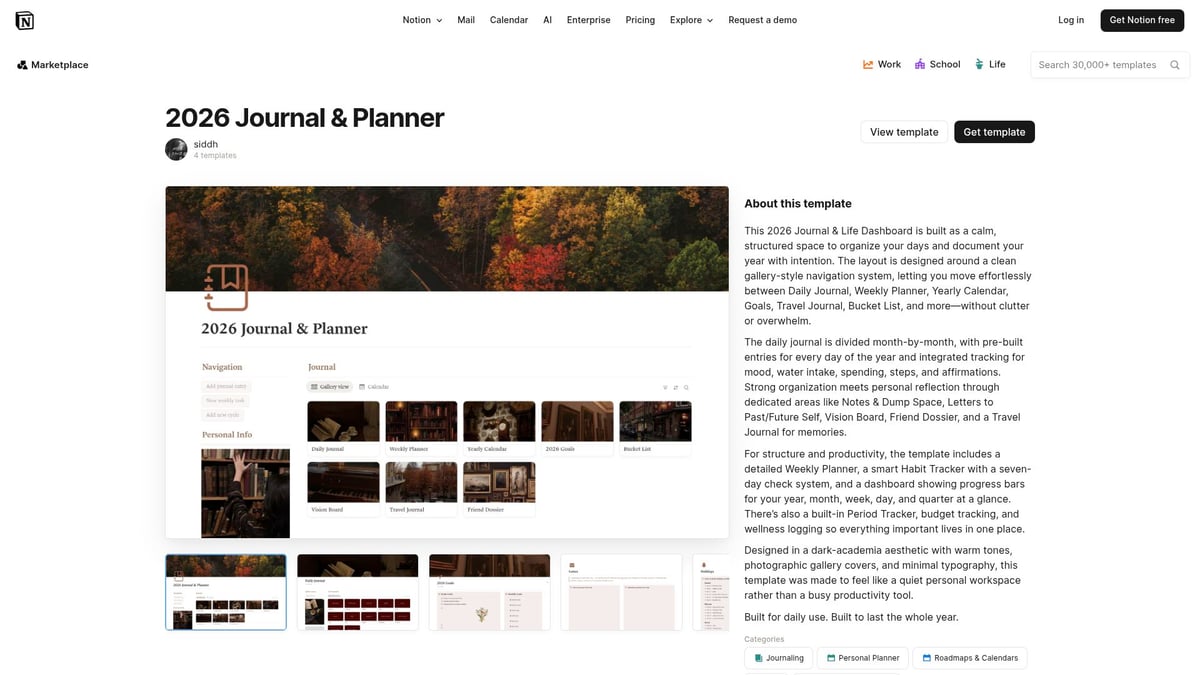
The 2026 Journal & Planner by siddh is a free template that combines productivity with mindfulness. It offers daily journaling pages, planner layouts, reflection prompts, and a yearly overview, supporting both organization and personal growth.
Core Features:
Unique Selling Points:
Pros:
Cons:
Example:
Document accomplishments and challenges, while staying organized with daily and yearly planning. This Notion planner helps users cultivate both productivity and mindfulness throughout 2026.
Looking for more options to match your unique workflow? Explore the All Notion templates library for a curated selection of Notion planner templates spanning every productivity style.
Selecting the ideal notion planner template starts with understanding your unique productivity style. Are you goal-oriented, schedule-based, or seeking an all-encompassing organization system? Identifying your approach will help you filter the many options available and ensure your notion planner truly supports your workflow rather than complicating it.
Start by reflecting on how you prefer to organize your days and projects. Some users thrive with a goal-driven notion planner that breaks down large ambitions into actionable steps. Others need a clear schedule with hourly breakdowns, while some want a holistic template that blends tasks, notes, finances, and wellness tracking. Matching your template to your style increases satisfaction and reduces friction in daily use.
Not every notion planner offers the same level of complexity or flexibility. Before you commit, list the features you cannot work without. Do you need integration with calendars or other apps? Is visual appeal a priority, or do you value minimalism? Customization is a key advantage of Notion, so seek templates that let you tailor dashboards, databases, and views to your needs. For example, some planners allow you to link tasks with projects, track habits, or embed documents for seamless access.
FeatureWhy It MattersWho Benefits MostCustomizationTailors to your workflowPower users, teamsVisual DesignBoosts engagementCreatives, studentsIntegrationStreamlines processesProfessionals, managersScalabilityGrows with your needsEntrepreneurs, teams
Budget is another vital consideration. Free templates are abundant and often highly functional, but paid options may deliver advanced features, premium design, or ongoing support. Weigh the value of your time and the critical features you require. If you are new to Notion, a free notion planner gives you room to experiment. As your needs evolve, consider investing in a paid template for extra power and polish.
Before finalizing your choice, test a few notion planner templates to see how they fit your daily routine. Many creators offer demo versions or walkthroughs. Leverage user reviews and community feedback to gauge real-world effectiveness. For a curated selection of templates tailored for 2026, visit Notion's 2026 Planner Templates and explore options designed for diverse productivity needs.
Remember, the best notion planner is the one that seamlessly integrates with your habits and goals. Stay open to refining your setup, drawing inspiration from the Notion community, and tweaking your template as your workflow changes.
Staying ahead in 2026 requires more than just using a notion planner—it demands strategic habits and advanced features. Unlocking the full potential of your notion planner can turn daily organization into a seamless, automated experience.
Leverage Notion AI for Automation
Modern notion planner templates now come equipped with AI capabilities. Use Notion AI to automate recurring tasks, generate smart reminders, and analyze your productivity data. AI can help break down goals, suggest daily actions, and keep you on track without manual input.
Integrate with Calendars and Productivity Tools
Sync your notion planner with Google Calendar, task managers, or email platforms. This integration ensures you never miss a deadline and have all information centralized. Connecting your notion planner to external tools streamlines workflows and reduces context switching, saving precious time each day.
Build Custom Dashboards and Databases
A powerful notion planner is only as good as its dashboard. Create custom dashboards that centralize tasks, goals, and project timelines. For inspiration, explore this Notion productivity dashboard guide to see how advanced templates can help visualize priorities and track progress at a glance.
Adopt Best Practices for Team Collaboration
If you work in a team, share your notion planner templates and set clear permissions. Use collaborative databases, assign tasks, and comment directly on pages. This fosters transparency and ensures everyone is aligned, whether you are remote or hybrid.
Enhance with Widgets and Embeddable Tools
Add widgets such as weather, habit trackers, or Pomodoro timers to your notion planner. Embedding these tools within your workspace can boost motivation and provide quick access to essential information. Visual enhancements also make daily planning more enjoyable.
Stay Organized with Tags, Filters, and Linked Databases
Use tags to categorize tasks and projects within your notion planner. Filters and linked databases let you view key data from multiple perspectives. This approach ensures nothing slips through the cracks and your workspace remains clutter-free.
Review and Update Regularly
Set aside time each week to review your notion planner. Adjust goals, archive completed projects, and update workflows as your priorities evolve. For those ready to take things further, consider the 2026 Advanced Notion Template, which offers comprehensive features for power users who want to push productivity boundaries.
Summary Table: Advanced Notion Planner Tips
Advanced StrategyBenefitUse Notion AIAutomate and analyze productivityIntegrate calendars/toolsCentralize all scheduling and tasksBuild custom dashboardsVisualize priorities and progressCollaborate with teamsBoost transparency and alignmentAdd widgets and embedsEnhance motivation and accessOrganize with tags/filtersMaintain clarity and structureRegular reviewsKeep your planner relevant and updated
By applying these advanced tips, your notion planner will not only organize your life but also help you adapt to the fast-paced demands of 2026.
In the rapidly evolving world of digital productivity, Notionland stands out as the premier destination for anyone seeking the perfect notion planner to elevate their workflow. Whether you are a student, professional, or creator, Notionland curates a vast collection of top-tier Notion templates designed to address every organizational need.
You will find both free and premium notion planner options, including exclusive releases and community-driven content. Each template is carefully reviewed to guarantee quality, reliability, and ease of use. If you are searching for a practical solution to streamline your daily routine, the Notion daily planner template is a valuable resource that exemplifies the platform's commitment to effective digital planning.
Notionland empowers creators to share, promote, and monetize their unique templates, fostering a thriving ecosystem of innovation. Members enjoy early access to new products, special discounts, and opportunities to participate in beta testing for upcoming features.
Whether you are looking to optimize your notion planner system or discover new productivity strategies, Notionland supports your journey with regular updates and expert guidance. Join the community today to unlock curated tools, connect with like-minded productivity enthusiasts, and transform your Notion experience for 2026 and beyond.
Now that you’ve explored these top Notion planner ideas for 2026, you’re ready to take your productivity to a whole new level. Whether you’re looking to streamline your daily routines, set ambitious goals, or find a planner that matches your unique style, it all begins with the right tools. Notionland makes it easy to discover, customize, and implement powerful templates designed for real results. If you’re eager to unlock your full potential and start organizing your life with expert-crafted resources, I encourage you to Shop Now and find the perfect planner for your journey.